
Steam price badge
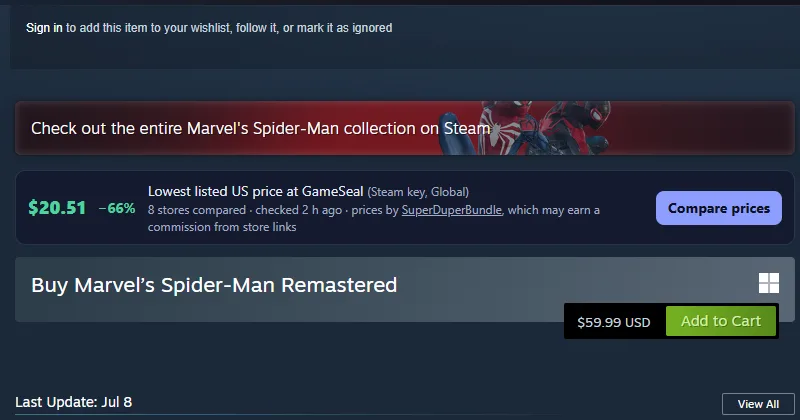
A free browser extension and userscript that shows the lowest listed key price from the stores SuperDuperBundle compares right on a game's Steam store page, with a link to the full comparison.
Install
- Chrome Web Store: in review
- Firefox Add-ons: in review
- Microsoft Edge Add-ons: in review
- Opera Add-ons: coming soon
- Userscript (Tampermonkey, Violentmonkey, Greasemonkey): install from Greasy Fork
What it shows
- The lowest listed price for the game's PC key, the store, where the key activates and its region, how many stores were compared, and when the price was checked.
- "Compare prices" opens the game's page on SuperDuperBundle, where every offer is listed.
- Prices are US-dollar listed prices as each store shows them; stores set fees and the final total at checkout.
- If Steam already shows you a US-dollar price at or below ours (regional pricing or a Steam sale), the badge stays hidden.
Privacy
It sends only the Steam app ID of the page you are on to SuperDuperBundle. No account, no tracking, no browsing history; it never changes links, cookies or checkout pages. Details: privacy policy. SuperDuperBundle may earn a commission when you buy through store links on its website; it never changes the price you pay or the order of offers (affiliate disclosure).
Source code
Open source (MIT): github.com/superduperbundle/game-price-api. It uses our free Game Price API. Problems or ideas: open an issue there.